Printing and Scanning with campusprint
What is campusprint?
campusprint is the University of Bamberg's central printing and scanning service. With the help of campusprint, the photocopiers on campus can be used as printers and scanners within the computer network.
Print jobs and scanned files can be managed or downloaded at campusprint.uni-bamberg.de. They remain stored on the server for 5 days.
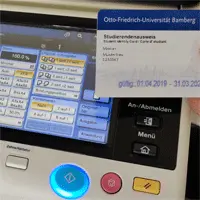
Figure 1 shows the campus printer's display along with a student ID card.
Set up (install) campusprinter
You can set up campusprinter on your PC to submit print jobs to the print server. We provide instructions on how to set up campusprinter on your PC.
[ That interests me! - Read more...]
Printing with campusprint
You can submit print jobs to the print server from any PC and then retrieve them at any of the photocopiers connected to campusprint to print them on paper. Print jobs remain stored on the campusprint server for five days. After that, they are usually deleted permanently!
[ That interests me! - Read more...]
Scanning with campusprint
You can use any copier at the University of Bamberg to scan documents and save them as JPG images or PDF files on the campusprint server. You can download your scanned files from any PC with an Internet connection. Scanned files remain stored on the campusprint server for five days. After that, they are permanently deleted!
[ That interests me! - Read more...]