Cloud storage in the University of Erlangen's FAUbox for syncing and sharing
FAUbox—what is it?
The FAUbox service is provided by Friedrich-Alexander University Erlangen (FAU for short) and is based on the Powerfolder system. The files are stored on servers at the Erlangen Regional Computing Center (RRZE for short).
Who can use the FAUbox?
The FAUbox is a service offered to the following groups of people at the University of Bamberg:
- full-time employees
- Doctoral students
How can I use the FAUbox?
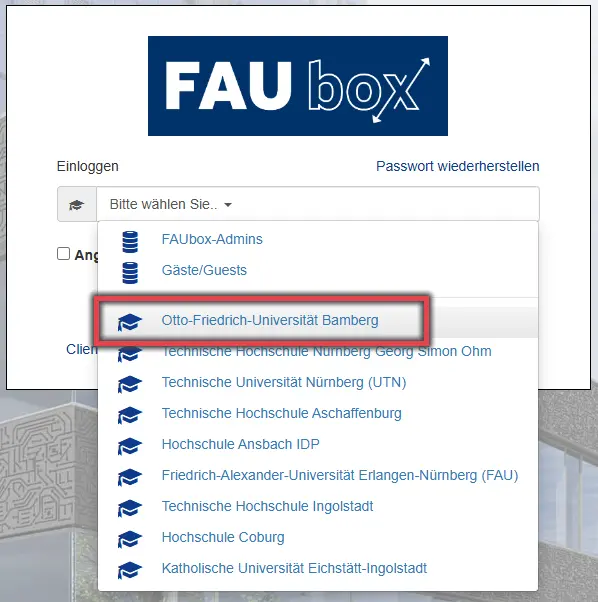
You will automatically gain access to FAUbox by visiting the login page at faubox.rrze.uni-erlangen.de, selecting Otto Friedrich University of Bamberg on the next page, and logging in with your BA number and the corresponding password.
Figure 1 shows the FAUbox login page with the University of Bamberg selected.
Each user has 50 GB of storage space available.
The storage quota can be increased upon request at softwarebeschaffung.its(at)uni-bamberg.de.
Using the website mentioned above, you can upload, download, and edit files online in FAUbox from any computer with an Internet connection (and, in the case of shared files, you can do so simultaneously with other users).
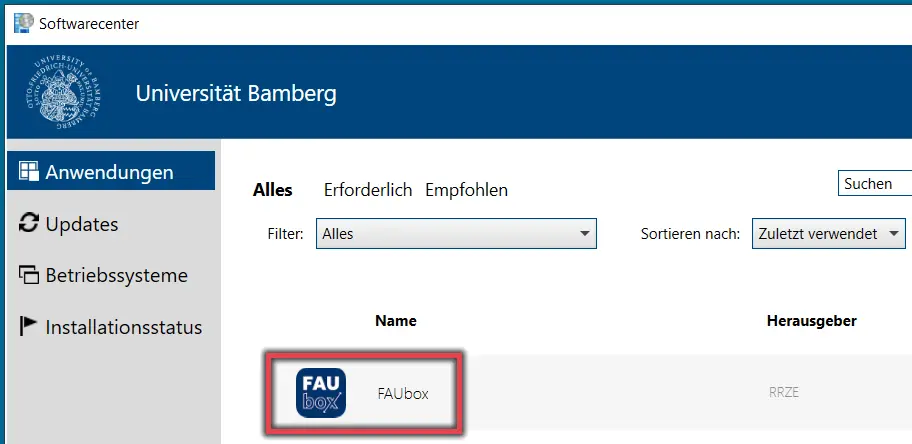
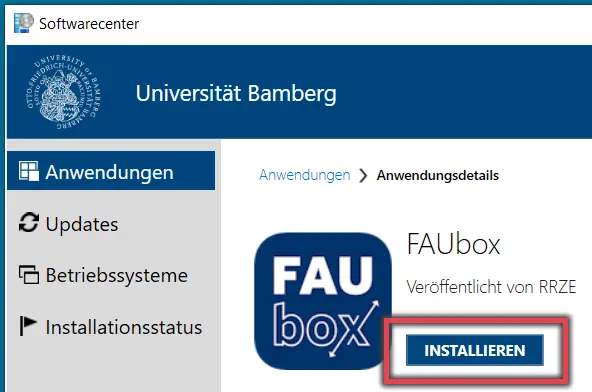
Open the Software Center on your computer.
Under “Applications,” click on FAUbox and then click the INSTALL button.
Once the installation is complete, the FAUbox will open, and you will need to log in here just as you would in a browser. To do so, select Otto Friedrich University of Bamberg again and log in with your BA number and the corresponding password.
Figures 3 and 4 show the Software Center with the FAUbox ready for installation.
You can find more information about the Software Center here.
In Windows Explorer, you'll find a navigation node (a shortcut) to the FAUbox folder on your computer. Files you save there will be synchronized with your FAUbox.
![[Translate to English:] Ansicht Link zu den Clients der FAUbox](/fileadmin/_processed_/0/2/csm_FAUbox-Clients-rahmen_b97c09cac8.webp "[Translate to English:] Link zu den Clients der FAUbox")
![[Translate to English:] Ansicht Liste verfügbarer Clients der FAUbox](/fileadmin/_processed_/2/3/csm_FAUbox-Clients-auswahl_689190aaa7.webp "[Translate to English:] Liste verfügbarer Clients der FAUbox")
Go to the web interface at faubox.rrze.uni-erlangen.de, click on “Clients” in the light-colored box at the bottom left (see Figure 4), then select the client available for your operating system using either Download or Visit (see Figure 5), and install it.
Once the installation is complete, the FAUbox will open, and you will need to log in again in your browser. To do so, select Otto Friedrich University of Bamberg again and log in using your BA number and the corresponding password.
In addition, a shortcut to the FAUbox storage folder is created on the desktop.
- Via a Client: Sharing Folders and Files Using a Client (FAUbox-Dokumentation)
- Via the Web Portal: Folder and File Links (FAUbox-Dokumentation)