Single sign-on with Shibboleth
What is Shibboleth and how does it work?
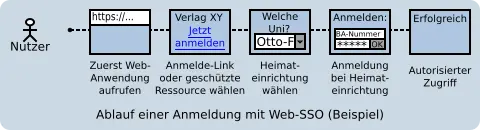
Logging in to web applications using Shibboleth (also known as Single Sign-On, or SSO for short) means logging in once and being automatically logged in to all web applications that support the Shibboleth service. Example: You log in to the IAM portal and then access the VC. When you click the Login for the University of Bamberg button there, you do not need to enter your login credentials again; instead, you are automatically logged in thanks to Shibboleth.
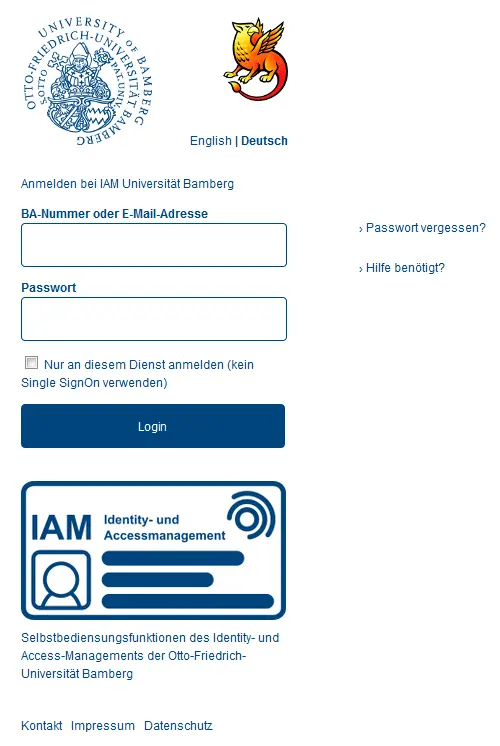
As soon as you click the corresponding login link on a web application that supports Shibboleth, or (for external web applications) specify the University of Bamberg as your home university, you will be redirected to the University of Bamberg’s Shibboleth login page, and a login screen will appear. The login page is identical for all systems. Here, you enter your personal BA number and the corresponding password. The first time you access IT services, a digital ID card is created, which provides information about the transmitted attributes.
Which web applications are supported?
The following is a list of all services that are available via Shibboleth authentication.
Internal services requiring Shibboleth login
- FlexNow2 for Employees
- FlexNow2 for Students
- IAM-Portal (Identity and Access Management)
- Mailex: Outlook Web Access
- Prozess Portal (Only available on the university network; a VPN may be required)
- UCware Client Telephony
- Virtual Campus (E-Learning)
- CEUS (Computer-Based Decision Support System for Higher Education in Bavaria)
- Data maintenance in UnivIS (accessible only on the university network; a VPN may be required)
- ZUVPORTAL
External services requiring Shibboleth login
In general, all services provided by participating providers in the DFN-AAI Federation (Federation of the German Research Network Association for Authentication and Authorization) and the eduGAIN Interfederation (GÉANT Authorization Infrastructure for the Research and Education Community) are available, provided that no separate agreements are required.
- DFN Webkonferencing System from the DFN Association
- DFN Schedule Planner (Foodle)
- Gigamove at RWTH Aachen
- Microsoft Imagine Standard / Premium
- Microsoft 365
- Statista-Portal
- StudiSoft-Portal of the University of Würzburg
What personal data is transmitted to the web applications?
Data minimization
When you log in to an external web application via Shibboleth, the provider requires certain information to verify your access rights. Only the data requested by the IT Service is transmitted; this means that the provider will only know, for example, that you are a student or employee at the University of Bamberg.
Digital ID
Your digital ID shows you exactly which personal data is transmitted to IT services. This is an electronic document that is generated individually for each application during every automatic login.
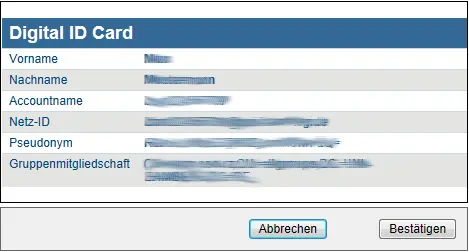
You will receive your digital ID the first time you log in to an information application. On each subsequent visit to the same web application, the ID will not be displayed again until one year has passed or until the information has changed.
Special considerations for active domain registration
If you are logged in to the UNI-BAMBERG.DE domain (which is the case on many university computers), you usually do not need to log in via Shibboleth, as your existing Windows login is automatically used (provided you logged in with your BA number and corresponding password).
Services that do not use Shibboleth for authentication still require a manual login.
How do I end a session and log out?
Every application you log in to usually has a logout option. We recommend using the logout option provided by each application.
If an application does not provide a logout option, you can log out by entering the URL https://idp.iam.uni-bamberg.de/idp/profile/Logout.
With Single Logout, you can log out of all web applications you've visited that use Shibboleth as their login method at the same time.