Set up staff e-mail account in Outlook under macOS
Important note:
To be able to integrate an e-mail account, you must have a valid user account (BA number + corresponding password).
Adding the e-mail account
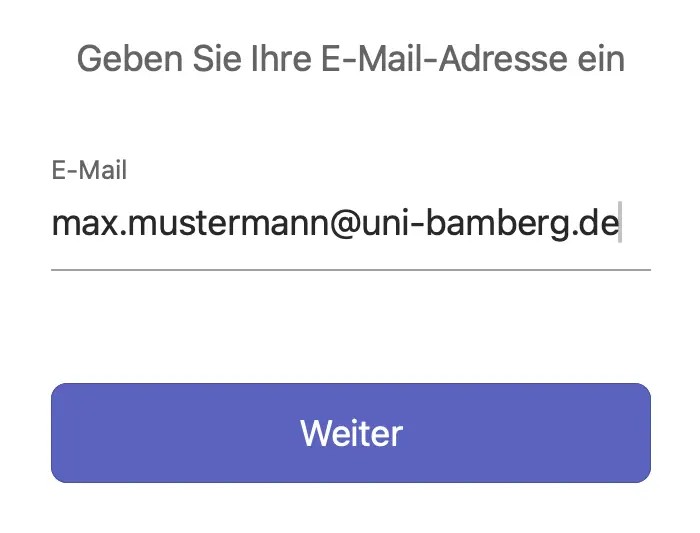
Figure 1: Enter e-mail address
Start Outlook and then open the sub-item Accounts... via the Tools menu.
Click on the + symbol and select New account...
Enter your university e-mail address in the window that appears, as shown in Figure 1. Click on Next to open a new window.
Setting up an e-mail account
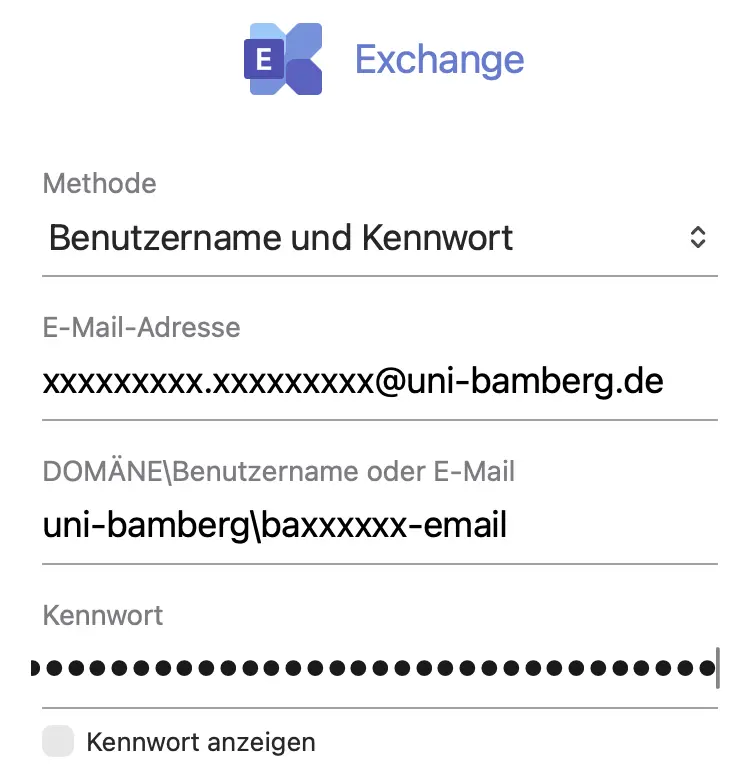
Figure 2: Setting up an e-mail account
If you have clicked on Continue as described above, a login window will now appear. Enter the relevant data here as follows:
Method: User name and password
E-Mail address: Your university e-mail address
DOMÄNE\User name or e-mail: uni-bamberg\Your personal BA-Number with the suffix -email
Example: uni-bamberg\baxxxx-email
Password: The password from the IAM-Portal under Email App Password
Now click on Add account. You may need to confirm the university certificate by clicking Next. After a moment, the account is set up and you can close the setup dialog by clicking on Done.
Figure 2 shows the login window with your user name and password filled in.